MiniMax
Obtain your MiniMax API key and configure it to power your Everywhere assistant.
This tutorial will guide you step-by-step on how to get an API key for MiniMax.
Site
In the preset mode, Everywhere will connect to the China mainland site of MiniMax. You need to visit platform.minimaxi.com to get an API key.
If you need to access the global site, please switch to advanced mode and fill in:
- URL:
https://api.minimax.io/anthropic - API Schema: Anthropic
Steps
- Go to the MiniMax Open Platform and register & log in to your account.
- After logging in, click on 接口密钥 on the left side of the page.
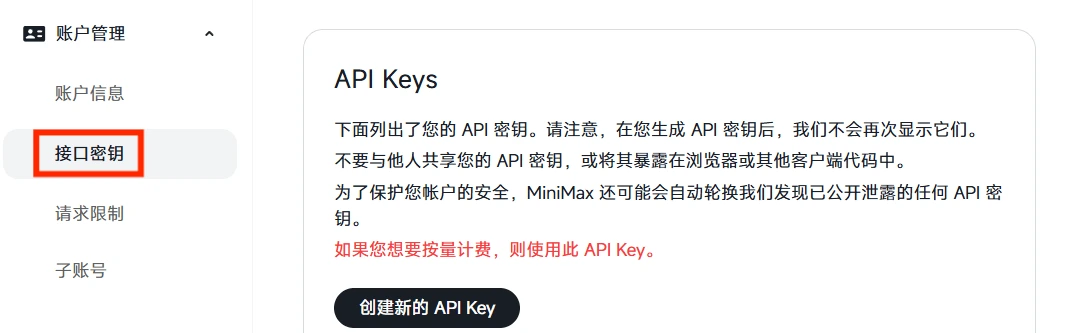
- On the right side of the page, click
创建新的 API Key, and then fill in the name of the key in the input box below to help you remember its purpose.
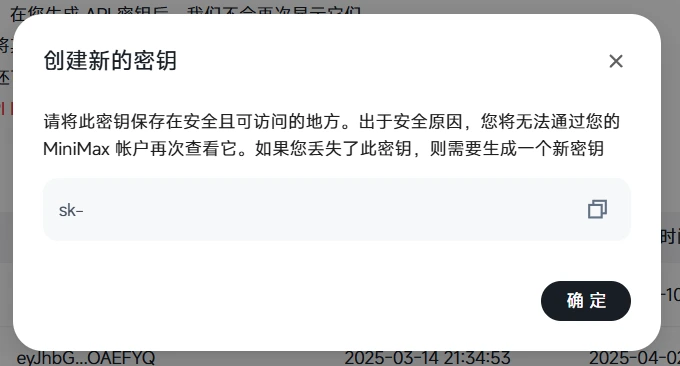
- Click the Create API Key button, and your API key will be displayed. Copy this key to continue in Everywhere.
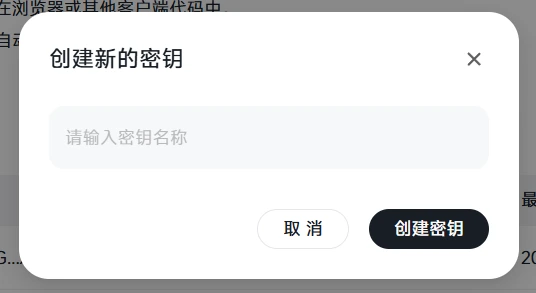
If you accidentally close the dialog box, you can click the copy button on this key in the 接口密钥页面 to copy it.
Privacy
Please note that the API key is sensitive information. Do not disclose it to anyone or share it in public.
How is this guide?
Last updated on