Frequently Asked Questions
Payments
I subscribed to ChatGPT Plus/Team/Pro or a similar service, why am I being told my balance is insufficient?
ChatGPT Plus/Team/Pro or Gemini Google One subscription services are billed separately from the API services.
You need to top up your balance for the API services separately.
Model Providers
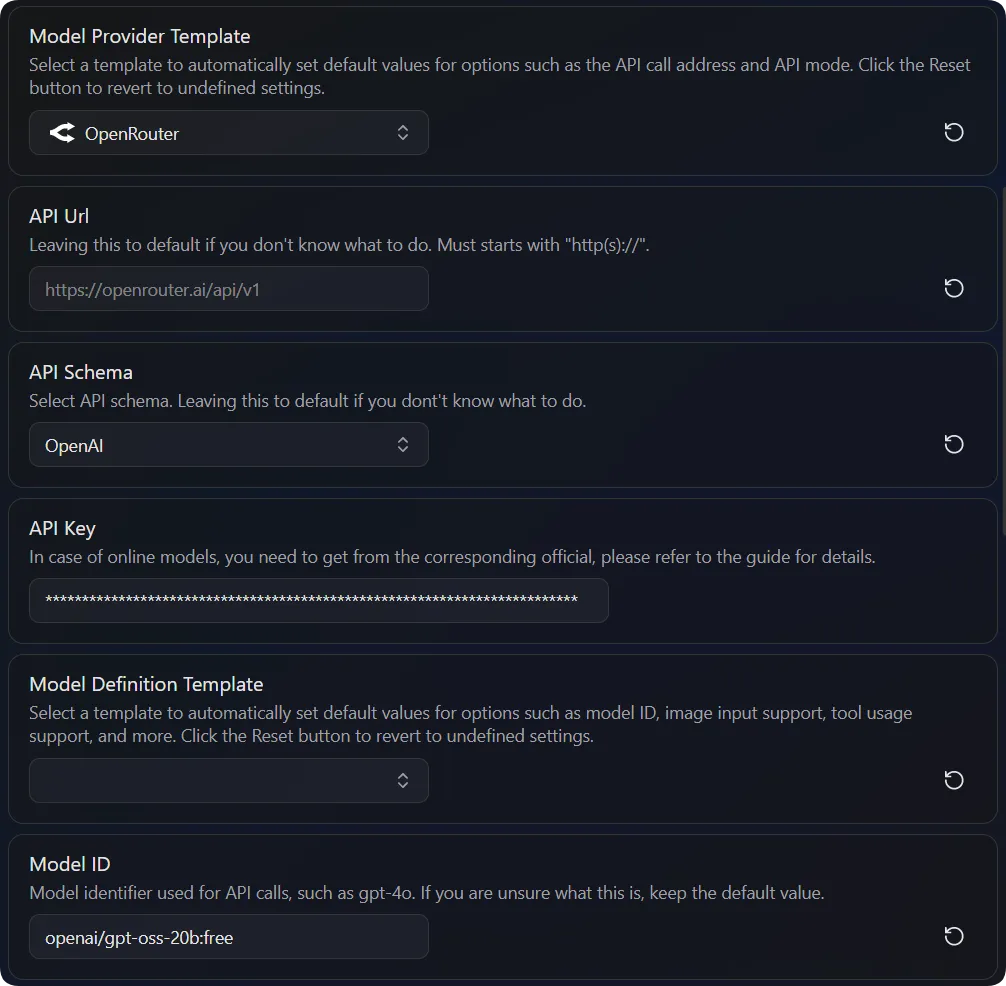
How to configure models when using a gateway provider (like OpenRouter)?
For example, if you are using the openai/gpt-oss-20b:free model within OpenRouter:
Why isn't my (unofficially supported) model provider working?
Everywhere supports a range of major model providers (e.g., OpenAI, Gemini, DeepSeek). For these officially supported providers, we strive to ensure their compatibility and stability.
However, there are many third-party or self-hosted model services that are compatible with the OpenAI API format. Due to limited resources, we cannot test and adapt to all unofficially supported model providers. If you encounter issues while using an unofficially supported provider, we recommend that you first contact the service provider for technical support or switch to an officially supported one.
The AI gives no response
If there is no response after asking a question (but status messages like Analyze Context are displayed), it might be due to an incorrect API Url configuration.
For example, a common mistake is entering https://api.openai.com instead of https://api.openai.com/v1.
How to find the correct API Url
If your model service provider is on
Everywhere's official support list, please keep the default Url.If you are using a third-party or self-hosted service, please refer to its official documentation to find the correct API Url (also known as "Endpoint").
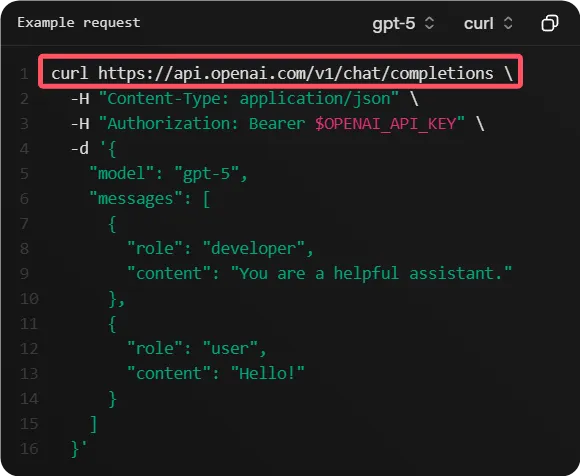
For an OpenAI-compatible API, you need to find an address like
https://api.example.com/v1/chat/completions, then remove the/chat/completionspart at the end to gethttps://api.example.com/v1, and enter this into theAPI Urlfield inEverywhere.
Why can't I use web search?
You may have noticed that when using services like ChatGPT, Gemini, or DeepSeek on their official websites, they have web search capabilities. This is because the providers' websites have integrated search functionality, which then combines the search results with the large language model to provide you with answers that include the latest information.
However, when we call these large language models via API, we are using their core text generation function, which does not include web search.
Everywhere interacts with these models via API. Therefore, to enable web search, you need an external search engine service (e.g., Google, Brave, Tavily, Bocha). You need to configure the corresponding search engine service in Everywhere to allow the AI to have web search capabilities when answering questions. For details, see Chat Plugins - Web Browser.
Software Usage
Why can't I bring up the floating chat window?
If you press the hotkey but don't see the Everywhere floating window, there are usually two possible reasons:
- Hotkey Conflict: The hotkey you set may be the same as another software on your system (e.g., screenshot tool, input method).
- Solution: Try changing the hotkey in
Everywhere'sChat Settingsand try again.
- Administrator Permissions: When you are active in a window running with administrator privileges (e.g., Task Manager, some installers),
Everywherealso needs to run with administrator privileges to display on top of that window. This is due to Windows' User Account Control (UAC) mechanism, which uses "Integrity Levels" to isolate programs with different permissions, preventing lower-privilege applications from controlling higher-privilege ones.
- Solution: In
Everywhere'sGeneral Settings, click theRestart as Administratorbutton and try again.